Welcome to WordPress. This is your first post. Edit or delete it, then start writing!
Blog
-

Sony WH-1000XM5 Hinge Repair Guide and Personal Tips
Many owners of the Sony WH-1000XM5 Wireless Noise-Canceling Headphones are familiar with the dreaded hinge problem, which tends to break over time. When my left hinge broke, I faced a tough choice: buy the brand new model(WH-1000XM6) for around ₱28,000 in the Philippines or try to fix it myself.
I’m not a repair expert, but I found a well-made YouTube tutorial that gave me the confidence to give it a shot. This post isn’t a strict repair guide. There are many of those already, but a personal reflection on my experience and the lessons I learned along the way. If you’re considering trying the fix yourself, here’s what I encountered:
Why I Tried DIY Instead of Buying New
My headphones still worked perfectly aside from the broken hinge. Buying a genuine replacement headband cost ₱5,000, a fraction of a new pair, and I wanted to challenge myself to try something new.
Following the Tutorial: My Experience
The tutorial I followed was detailed and easy to understand, which helped with my confidence. The entire process took about 2 hours, mostly because I went slowly and double-checked everything.
What I Learned (My Key Takeaways)
- Label your screws: There are many small screws, and labeling them saved me from confusion during reassembly.
- Take your time: Rushing leads to mistakes. Patience was essential.
- Be gentle: The internal components are fragile; handling them with care is crucial.
- Unplug the battery first and plug it in last: This is safer and reduces the risk of electrical issues.
- Confidence grows with experience: While my engineering experience was helpful, I know that careful, step-by-step effort can make this doable for non-experts as well.
Is There a Cheaper Fix? Just Replacing the Hinge
If budget is tight, you might consider replacing only the broken hinge, which can cost about half the price of a full headband replacement is roughly ₱2,500. However, this option is more complicated because you need to manually remove and reconnect the hinge swivel and replace the 16-pin clip. It is complicated as it sounds.
Why I Opted for the Full Headband Replacement
For me, the full headband swap was the safer and more straightforward approach. Although it was more expensive than just changing the hinge, it reduced my risk of damaging internal wiring and gave me peace of mind that the repair would hold up.
Was It Worth It?
Absolutely! I saved thousands of pesos, regained my favorite headphones, and gained newfound appreciation and confidence handling my own tech. This repair experience made my Sony WH-1000XM5 even more special to me.
For Those Considering DIY Repair
If you’re a regular user like me, trying this repair is doable if you find a clear tutorial and take your time. This article shares my story rather than serving as a detailed how-to, but I hope it encourages anyone who’s hesitant.
If you want to try, here’s the YouTube tutorial I followed: Sony WH-1000XM5 XM5 Headphones Headband Swivel Hinge Replacement | Repair Tutorial Fix Steps.
Frequently Asked Questions
How much does it cost to repair a Sony WH-1000XM5 hinge in the Philippines?
An original replacement headband costs about ₱5,000, while a single hinge replacement can be about half that price.Is it difficult to DIY fix the Sony WH-1000XM5 hinge?
Yes. With patience and a solid tutorial, many non-experts can do it but you’ve got to be careful with which wires to to what pin. Replacing just the hinge is more complicated due to wiring.Where can I get genuine Sony WH-1000XM5 replacement parts?
As of writing this, I ordered the replacement part from Shopee. If Shopee is not available in your area, genuine parts may also be found on other online stores. However, be sure to carefully check reviews before purchasing, as some replacement parts sold online are not original.This personal story highlights my path, from frustration with a broken hinge to successful repair. I hope it helps other Sony WH-1000XM5 owners make an informed decision about their own headphone repairs.
I’ve always enjoyed getting hands-on with my own devices, whether it’s attempting a Sony WH-1000XM5 hinge repair or performing routine maintenance on my gear. In fact, here’s an article I made way back when I did maintenance for my gaming laptop, Clover. If you want tips on laptop care or just enjoy these kinds of stories, check it out here.
-
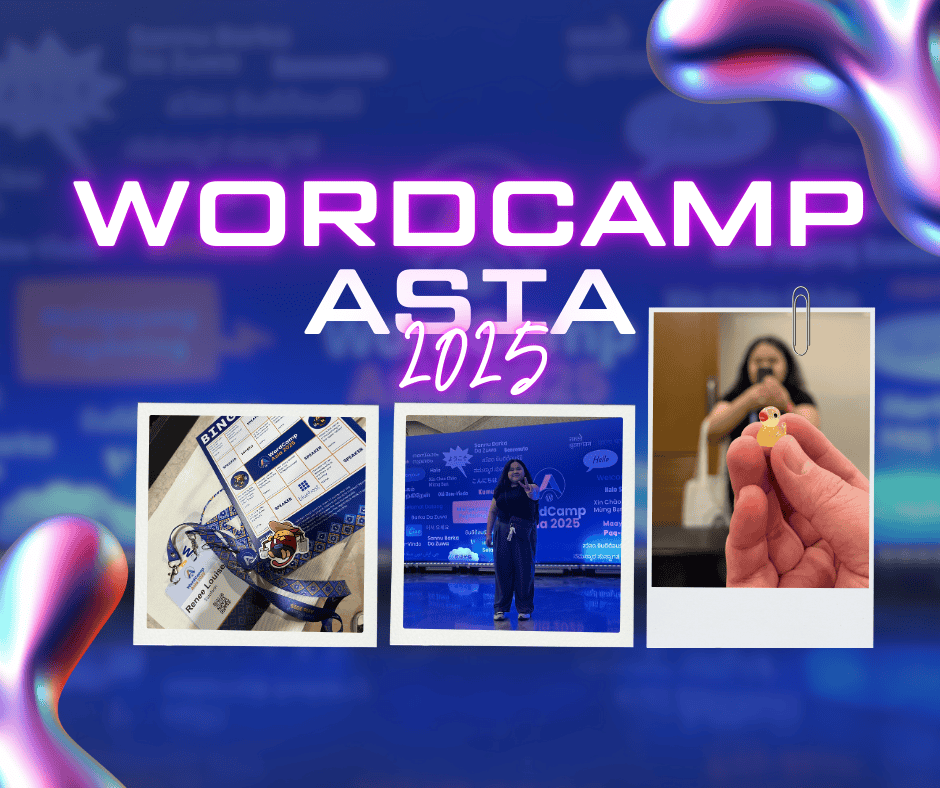
WordCamp Asia 2025 Experience
I would like to begin by expressing my heartfelt gratitude to my sponsors, createIT, for generously covering my travel and accommodation expenses for WordCamp Asia 2025. This WordCamp Asia 2025 experience is something I will cherish throughout my career, as the event reignited a passion that had dimmed over the years.
Sessions
If only I could attend every session, I would have been there each day. Fortunately, all the sessions were recorded and uploaded to YouTube. This ensures no one misses out on the WordCamp Asia 2025 experience! My first WordCamp was in 2018. Back then, I was overwhelmed by the schedule and missed sessions I intended to attend.
This year, I took a proactive approach by plotting my own schedule and printing it. I created physical copies of my WordCamp itinerary. I marked each session as complete once attended, which helped me stay focused. I’m glad the website’s schedule page allows marking and emailing the schedule list. However, I preferred creating my own to familiarize myself with the schedule and format it to my liking.
Most sessions I attended were technical. I wanted to enhance my skills and stay updated on the latest WordPress developments. I first attended Ryan Welcher’s session, “The Block Developer Cookbook: WC Asia 2025 Edition.” It was a workshop where I enjoyed “cooking” blocks with him! Initially, I found creating blocks intimidating. Ryan’s cookbook, with its clear explanations and provided code, made me realize there was nothing to fear. I thoroughly enjoyed the workshop!
More Valuable Sessions
Other sessions I found valuable included Celia Rozalén Martín’s “Pocket to Post: Manage and Automate Your Site from Your Phone,” where she demonstrated how to automate posts from your phone to your WordPress site, encouraging a more relaxed lifestyle—live a chill life. Milana Cap’s “WordPress Gems for Devs: Fresh New Features You’ll Actually Want to Use” showcased the WP_HTML_Tag_Processor as a replacement for preg_match(), and the Interactivity API, which provides standard interactions for blocks. Birgit Pauli-Haack’s “Create a Demo with Playground” explored WP Playground, demonstrating how you can instantly run WordPress to test themes/plugins. When asked about security concerns, she mentioned they are working on it, but for now, it’s best to run locally to secure premium plugins and protect intellectual property.
Interactive Activity
The organizers of WordCamp Asia 2025 added a unique touch to the event by gamifying the interactive activities, enhancing the overall experience. One standout activity was the “Duck Challenge,” where participants hunted for miniature rubber ducks. A special prize awaited those who found the “duckling egg” (Nickname: Balut), while regular ducks offered bragging rights as a treasure hunter.
This game drew inspiration from the concept of “Rubber Duck Debugging,” popularized by Andrew Hunt and David Thomas. It’s amusing how we ‘hunt’ the rubber ducks—well played, organizers! Essentially, rubber duck debugging is a technique for solving coding problems by explaining your code aloud to an inanimate object, like a rubber duck. Over the years, my “rubber ducks” have been my desk buddies.
Being competitive, I found the duck hunt challenging until I unexpectedly succeeded. While engrossed in completing the “Bingo Game” (which I’ll explain later), I approached an organizer, Anand, and we struck up a conversation. I asked if he could sign the bingo card box for “Connect with an organizer,” and he gladly obliged. We chatted about his experience in the Philippines and his visit to one of the best tourist destinations, Palawan. It was delightful talking with him. Before we parted, he asked if I had found a rubber duck. When I said no, he handed me one! I didn’t expect that, and he explained it was because I was genuinely connecting with people, not just collecting signatures. I will never pass up a great conversation, as I believe everyone carries a fascinating story worth hearing.
Bingo Card Game
Next, let’s dive into another engaging activity, the “Bingo Card Game,” an initiative executed with the help of some amazing local team members and led by Anand. This bingo card game challenged participants to answer trivia questions about the Philippines and the event venue, place stickers collected from each session, and gather signatures or names of people who met specific criteria.
Initially, I was determined to complete the bingo card, but some boxes remained unfilled because I couldn’t attend Contributor’s Day. Instead, I shifted my focus to meeting people, using the bingo card as a wonderful excuse to get to know them. My extroverted side flourished, and I made new friends and connections.
Listening to their stories and experiences made me realize that I wasn’t just engaging with people to complete the game; I was using it as a conversation starter. I’m thrilled this game existed. As a bonus, my raffle ticket was selected, and I won a prize for completing the bingo card game!
Community
The WordCamp Asia 2025 event attracted a diverse group of attendees, not just from Asia, but from all over the world! The massive support for WordCamp Asia was evident, showcasing a community built on inclusivity and empowerment. Everyone was there to learn from the best, and this is what I truly miss—learning in person. I met new friends and connections, which I will cherish. Learning from insightful sessions and discovering stories and cultures from people around the globe. These types of events are what strengthens the organization.
To the organizers and volunteers, you did an outstanding job pulling off one of the best WordCamps yet. Your hard work truly paid off! Everyone was accommodating and incredibly helpful. Kudos to all of you!
Let’s also acknowledge the sponsors for believing in WordCamps and helping attendees understand more about their products, while giving back through fantastic raffle prizes! There were a couple of sponsors whose products I’ve used. I don’t know about you, but when I meet the people behind the products and plugins I use and get to talk to them personally, I feel proud. Maybe it’s just me fangirling, or perhaps it’s the confidence that they are improving their products based on consumer needs.
Exciting news—the next WordCamp Asia will be held in Mumbai, India! How thrilling is that!?
Takeaway
Reflecting on my WordCamp Asia 2025 experience, I have several key takeaways that have made this journey both educational and inspiring. Firstly, the importance of community was evident throughout the event. Meeting new friends and forming connections with people from diverse backgrounds enriched my understanding and appreciation of the global WordPress community. Secondly, the technical sessions provided invaluable insights into the latest WordPress developments, enhancing my skills and confidence in using new tools and techniques. Lastly, the interactive activities, like the Duck Challenge and Bingo Card Game, highlighted the value of engaging with others and learning through fun and creativity. This experience has reinforced my belief that there is always something new to learn each day and countless amazing people to learn from. It reminds me of my journey into technology, as shared in my article “Tech and I, How I Got Into It.” I truly value this experience and look forward to applying what I’ve learned in my future endeavors.
-

Programming Languages as EDM Genres
As a music lover and an avid fan of EDM, I often find myself drawing parallels between the vibrant world of electronic dance music and the diverse landscape of programming languages. Each EDM genre has its own unique characteristics, just like programming languages do. Imagine if we could explore how the qualities of popular programming languages align with various EDM genres. In this article, we explore how programming languages as EDM genres highlight the unique characteristics of both fields. Let’s dive into this fun and creative comparison!
Exploring the Vibrant World of Programming Languages as EDM Genres
1. Python – Chillstep
Python is known for its clean and easy-to-read syntax, making it accessible for beginners. Similarly, Chillstep offers a laid-back vibe with smooth melodies and gentle beats, perfect for relaxation.
Additionally, just as Chillstep can blend with various other genres, Python is versatile, used in web development, data analysis, artificial intelligence, and more.
Track:
2. JavaScript – House
JavaScript brings websites to life with interactivity, much like House music energizes the dance floor with its infectious beats, rhythms, and uplifting melodies. Moreover, the House genre has a strong community, with countless sub-genres and collaborations, paralleling JavaScript’s vast ecosystem of libraries and frameworks like React and Node.js.
Track:
3. Java – Trance
Java is known for its strong typing and object-oriented structure, providing reliability in large applications. Trance music, with its uplifting melodies and build-ups, creates a sense of euphoria and stability on the dance floor.
Furthermore, just as Trance has stood the test of time, Java remains a staple in enterprise environments, proving its longevity and effectiveness.
Track:
4. C++ – Dubstep
C++ offers low-level memory manipulation and high performance, akin to Dubstep’s heavy bass drops and intricate sound design that demand attention and control.
Both C++ and Dubstep can be complex and challenging, appealing to those who enjoy diving deep into the technical aspects of programming and music production.
Track:
5. Ruby on Rails – Future Bass
Ruby on Rails is celebrated for its elegant syntax and focus on developer happiness, much like Future Bass, which is known for its melodic and emotional soundscapes.
Just as Future Bass pushes the boundaries of electronic music with its innovative production techniques, Ruby on Rails encourages creativity and innovation through its flexible and intuitive design, allowing developers to craft unique solutions.
Track:
6. C# – Trap
Trap music is characterized by its heavy use of hi-hats, deep bass, and energetic beats, similar to C#’s ability to handle complex programming tasks with its rich feature set and object-oriented design.
Just as Trap has gained immense popularity and can be found in various forms across different media, C# is widely used in game development, particularly with Unity, and is popular among developers for building Windows applications.
Track:
7. Swift – Progressive House
Swift is a modern programming language designed for iOS and macOS development, emphasizing performance and safety. Progressive House is known for its evolving soundscapes and innovative production techniques, creating a journey for listeners.
Just as Progressive House is accessible yet sophisticated, Swift is designed to be easy to learn while offering powerful features for developers.
Track:
8. Go – Techno
Go is designed for high performance and efficient concurrency, making it ideal for scalable applications. Techno, with its repetitive beats and driving rhythms, creates an immersive experience that keeps the energy flowing.
Both Go and Techno embrace minimalism, focusing on what’s essential to create powerful outcomes without unnecessary complexity.
Track:
9. Kotlin – Synthpop
Synthpop is known for its catchy melodies and modern electronic sounds, much like Kotlin’s concise and expressive syntax that makes programming enjoyable and efficient.
Just as Synthpop combines innovation with accessibility, Kotlin offers modern features that enhance productivity while being easy to learn and use, making it a favorite among mobile developers.
Track:
10. PHP – Drum and Bass
Drum and Bass is known for its dynamic beats and versatility, much like PHP’s ability to adapt to various web development tasks with its flexible and dynamic nature.
Just as Drum and Bass has a global following and presence in diverse music scenes, PHP is widely used across the web, powering a significant portion of websites and applications.
Track:
Conclusion
In conclusion, comparing programming languages to EDM genres allows us to appreciate their unique qualities. Each brings something distinct to the table. Whether you’re coding in PHP or dancing to House music, both worlds offer creativity, community, and a sense of joy. Selecting tracks that resonate with each programming language was a delightful challenge, reflecting the personal connections we form with both code and music. So next time you’re debugging your code or enjoying a festival, think about the parallels between these two fascinating realms!
Let your creativity flow, both in code and on the dance floor! Check out my daily tools as a programmer that might help enhance your coding journey.
-

Cursor Code Editor 2025: My Daily Tools as a Programmer
In 2022, I shared an article detailing the tools I used daily as a programmer. Fast forward to 2025, and my coding environment has evolved significantly with the Cursor code editor 2025 leading the charge. As technology advances, so do our preferences, and Cursor has become my new go-to tool.
Coding Daily Tool: Cursor
In the past, I relied heavily on Visual Studio Code for my coding needs. However, as of 2025, Cursor has become my preferred choice. Cursor is a fork of Visual Studio Code, offering a familiar text editing experience while enhancing it with powerful AI-driven features. It supports a wide range of programming languages and provides advanced capabilities that significantly boost productivity and code quality.
Why Choose Cursor Code Editor 2025?
Cursor code editor 2025 stands out for several reasons…
- Intelligent Code Completion: Cursor includes a powerful autocomplete feature that predicts your next edit. It suggests edits across multiple lines, taking into account your recent changes, which speeds up coding and reduces errors.
- Multi-Line Edits: Save time with Cursor’s ability to suggest multiple edits at once, allowing you to implement changes efficiently.
- Smart Rewrites: Type carelessly, and Cursor will fix your mistakes, ensuring your code is clean and error-free.
- AI-Powered Chat: Engage with an AI that sees your codebase. You can ask questions like “Is there a bug here?” and get instant feedback. The chat can reference your entire codebase, making it a powerful tool for debugging and learning.
- Instant Apply: Easily apply code suggestions from the chat directly into your codebase with a simple click, streamlining your workflow.
- Codebase Answers: Use Cursor to search your codebase for relevant information, helping you find answers quickly and efficiently.
- User-Friendly Interface: Cursor’s interface is intuitive and easy to navigate, making it accessible for both beginners and experienced developers.
Cursor combines the familiarity of Visual Studio Code with enhanced AI-driven features, making it a powerful tool for modern developers. Whether you’re writing new code or refining existing projects, Cursor is designed to make your coding experience more productive and enjoyable.
Pricing
Cursor offers several pricing plans to suit different needs:
- Hobby: Free, includes a two-week pro trial, 2000 completions, and 50 slow premium requests.
- Pro: $20/month, includes everything in Hobby plus unlimited completions, 500 fast premium requests per month, and unlimited slow premium requests.
- Business: $40/user/month, includes everything in Pro plus features like privacy mode enforcement, centralized team billing, and an admin dashboard.
These plans ensure that whether you’re a hobbyist or part of a business team, there’s a suitable option for you. Cursor’s pricing reflects the value of its advanced features and the cost of running large language models sustainably.
I opted for the Pro plan because it offers unlimited completions and a generous number of fast premium requests, which are essential for my workflow. The Pro plan hits the sweet spot for me—it’s packed with all the advanced features I need without the extra bells and whistles of a business plan, making it both affordable and super functional.
Other Essential Tools
While Cursor is my new coding tool, my other daily tools remain unchanged:
- Knowledge-based Tool: Stack Overflow continues to be my go-to platform for troubleshooting and learning from the community.
- Project Management Tool: ActiveCollab helps me organize and track my projects efficiently.
- Project Repository Tool: GitLab remains my choice for source code management, providing robust features for collaboration and security.
Conclusion
While my coding tool has changed, the essence of my daily workflow remains the same. Cursor has brought a fresh perspective to my coding sessions, enhancing both productivity and enjoyment. As always, the tools we choose are deeply personal, and what works for me might differ from your preferences.
Here’s to embracing new tools and technologies that make our programming journeys more exciting and efficient!
-
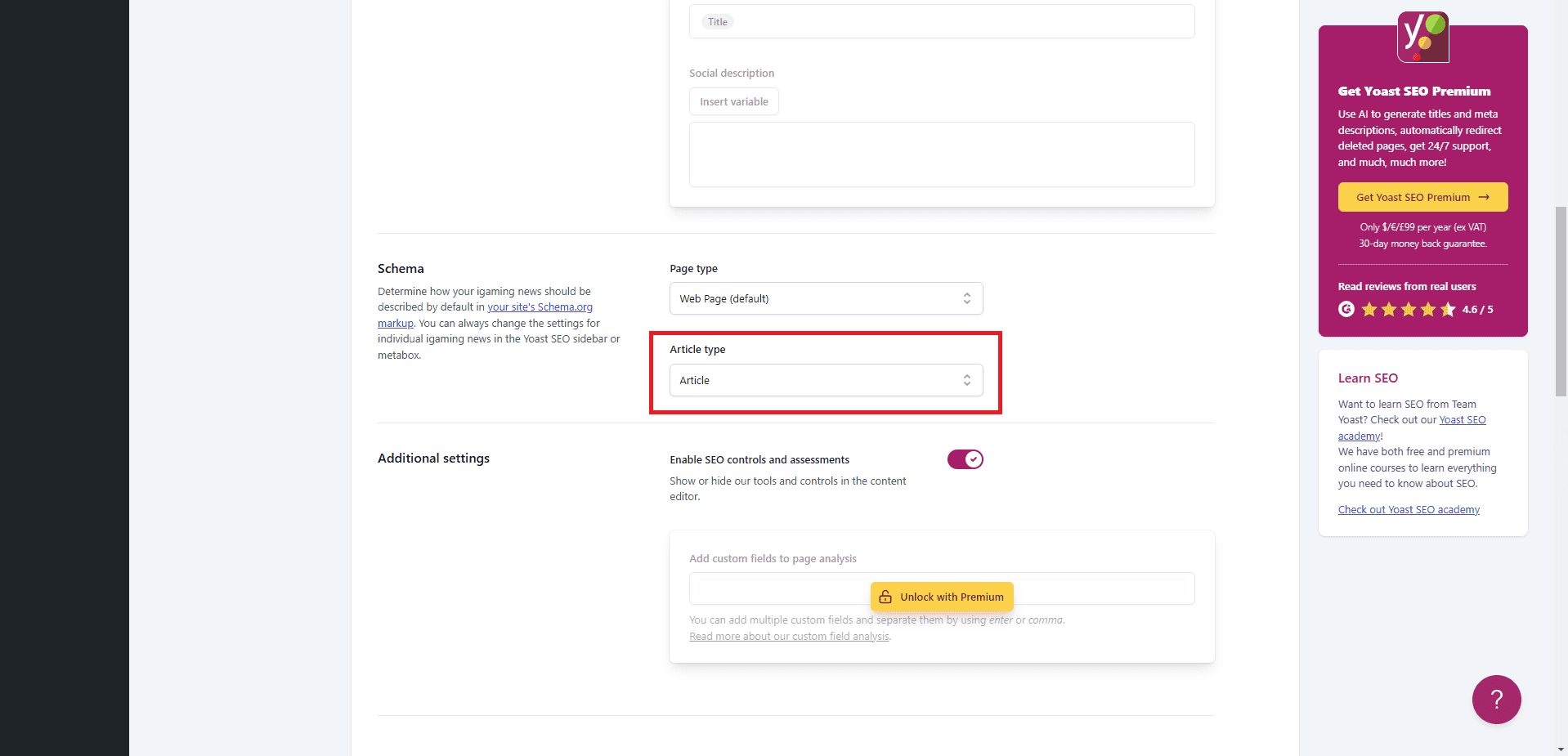
Add Article Schema to Custom Post Types in WP for Yoast SEO
Hi fellow WordPress enthusiasts! If you’re looking to sprinkle some SEO magic on your custom post types using Yoast SEO, you’ve come to the right place. Today, we’re diving into the world of Article schema—because who doesn’t want their content to be the star of the search engine show?
Benefits of Adding Article Schema to Custom Post Types
Article schema is like a backstage pass for search engines, giving them a VIP tour of your content. By default, Yoast SEO rolls out the red carpet for standard post types, but with a little tweak, you can extend this privilege to your custom post types too. Let’s get started!
How to Add Article Schema to Custom Post Types
1. Add Article Schema to Your Custom Post Type
First up, let’s teach Yoast SEO to recognize your custom post type, like ‘book’, as worthy of Article schema. Here’s a nifty function to do just that:
/**
 * Add 'book' to the list of articles post types, so books get Article schema.
 *
 * @param  mixed $post_types The current list of post types.
 *
 * @return array Array of post types for which Yoast SEO renders Article schema.
 */
function article_schema_for_books( $post_types ) {
    $post_types[] = 'book';
    return $post_types;
}

add_filter( 'wpseo_schema_article_post_types', 'article_schema_for_books' );
This little snippet hooks into the wpseo_schema_article_post_types filter, adding ‘book’ to the list of post types that will strut their stuff with Article schema.
2. Ensure Your Post Type Supports an Author
Now, here’s the part that often gets overlooked—like forgetting to add salt to your soup. For the Article schema to work its magic, your custom post type needs to support an author. Add this line to make sure your ‘book’ post type is author-friendly:
add_post_type_support( 'book', 'author' );Important Note
Currently, this method doesn’t work for the ‘page‘ post type. But don’t worry, the Yoast team is on it—like a cat on a laser pointer.
Conclusion
And there you have it! With these steps, your custom post types can bask in the SEO spotlight, thanks to Article schema. By adding Article Schema to your custom post types, you enhance your site’s SEO and visibility. Keep an eye out for updates from Yoast, as they’re always working to make their plugin even more awesome.
Feel free to reach out if you have any questions or need further assistance. Until next time, may your code be clean and your rankings high! -

Tech and I, how I got into it.
Growing up, I’ve always dreamt of being an astronaut. I loved the idea of exploring the unknown and pushing the limits of human knowledge. However, as I got older, my interests began to shift towards tech. My first encounter with a computer happened in third grade when I started playing video games. From that point on, I was hooked.
Early years
In fourth grade, I got interested in tech during my first ever computer class that taught me basic computer functionalities and peripherals. We had typing contests, and built Christmas trees made out of special characters that was made possible by a program compiler. I was fascinated by how computers work and what it could do. As I got older, I started to explore more of what technology had to offer.
In high school, I was introduced to programming using Turbo C, and then later on, I learned about web development using HTML and CSS. It was during this time that I realized how much I enjoyed programming and creating things on the computer. I also found myself customizing my friendster social media profile using HTML and CSS to personalize it. Unfortunately, the social media website had to shutdown because of lack of engagement by the online community. So my personalized webpage is lost forever.
Profession
After graduating with a Bachelor of Science in Computer Engineering Major in Computer Networks, I became a software engineer by profession. It was a dream come true to work in an industry that I was passionate about. However, I knew that I wanted to do more and move up the ladder. So I took the job as a deputy manager to hone my leadership skills but still work as a programmer at the same time. I have set career goals for myself to direct me to a path where my experience, efforts, and skills will be used. My ultimate goal really is to own a software company or a company where my skills are needed and can help make the world a better place.
Realization
I believe that a career is pursued based on a person’s life experience and what they want and need. I do hope that people do what they love to do and be happy about it. You know? Find your own true calling.
Being a woman in tech hasn’t been easy, but I’ve never let that stop me. I’ve faced challenges, but I’ve learned to push through and prove myself. I believe that women have a lot to offer to the tech industry, and it’s important to encourage more women to pursue careers in this field.
In conclusion, pursuing a passion for technology has been one of the most rewarding experiences of my life. It has taught me to be patient, persistent, and to never give up on my dreams. If you’re thinking about a career in tech, don’t let anything stop you. Follow your passions and see where they take you.
-

My Daily Tools as a Programmer in 2022
In any job, one should have their daily tools. As simple as a pen and paper for an author, or as complex as the large hadron collider for a scientist.
The following that I am about to enumerate are software applications or websites that I use when working on projects on a daily basis. You’re probably here because you’d like to get some recommendations on what to use, or you’re just exploring around. Here are my important daily tools while working!
Coding Daily Tool: Visual Studio Code
Visual Studio Code (VS Code) takes the number 1 spot for the daily tools I use. It is a code editor that mainly helps me with creating and modifying project files. This editor supports many programming languages that many programmers use and it has intelli-sense. Intelli-sense means it detects code in a file if it is incomplete or has warnings/errors.
This editor has hundreds of themes available in the application’s marketplace. And you can even program your own theme if you’re up for the challenge.
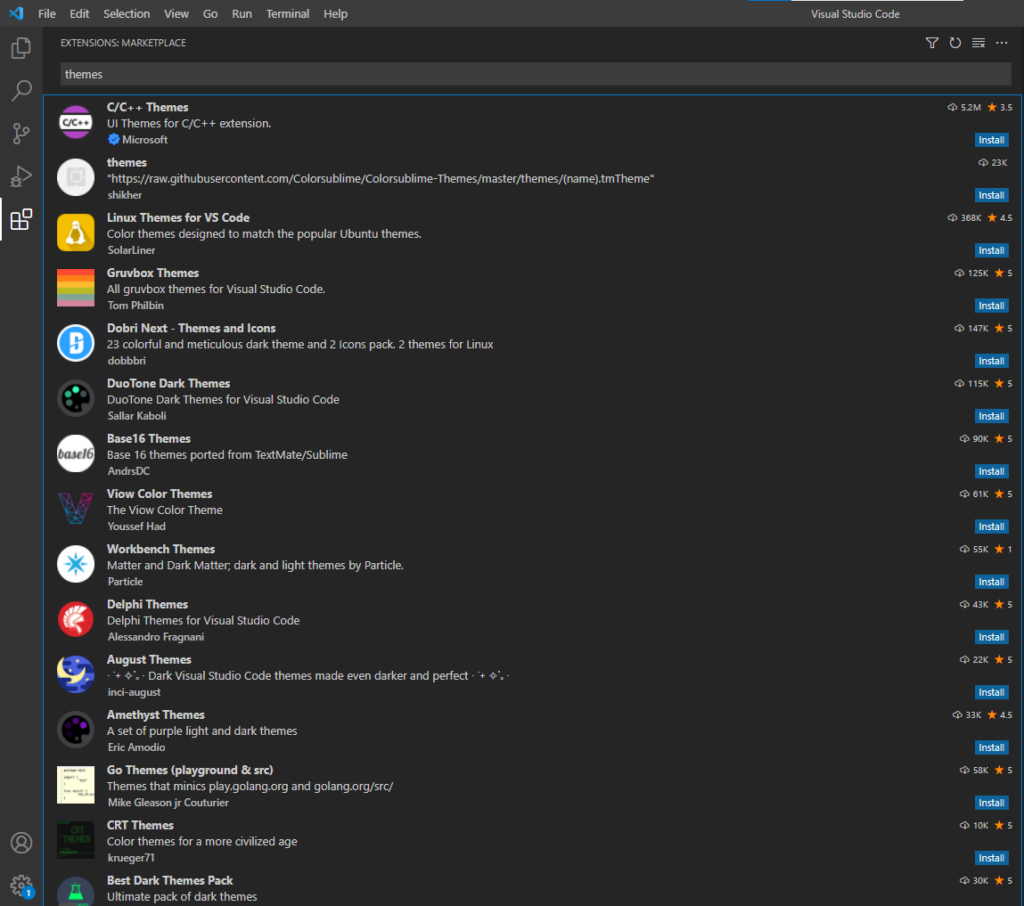
There is more to this software than just themes. You can also integrate this editor with useful extensions to make your project development easier. Some honorable mentions for extensions: GitLens, PHP Extension Pack, and Path Intellisense.
There are plenty of editors to choose from as an alternative like Vim, Notepad++, Sublime Text, and Atom, just to name a few.
VS Code, Sublime Text, and Atom are similar. I have used the other two previously and I can recall a few incidents where the application crashed while using them, which I haven’t experienced with VS Code yet. They are customizable and those editors can be tweaked for your preferences as well.
I’ve been using VS Code for years now because of personal preferences in terms of usage, visual comfortability, and I haven’t experienced application crashes.
Knowledge-based Tool: Stack Overflow
Stack Overflow is a knowledge sharing platform that assists me while I code. Errors or warnings sometimes appear while developing a site or an application. And Stack Overflow is a database or a huge library of answers from users who experienced warnings/errors before. If not all, majority of the chosen answers have good explanations on why this occurred, and how to fix it step-by-step.
This website has collaboration features that enables other users or moderators to modify answers to correct it and provide a deeper explanation. Keep in mind that not all answers are correct fixes of the errors that’s why the community has the power to upvote or downvote the answers.
Like any other website that allows users to post anything, there are rules to follow for easy moderation. Better read the guidelines first before posting a question. Your question might be flagged as duplicate of an existing one, or be removed.
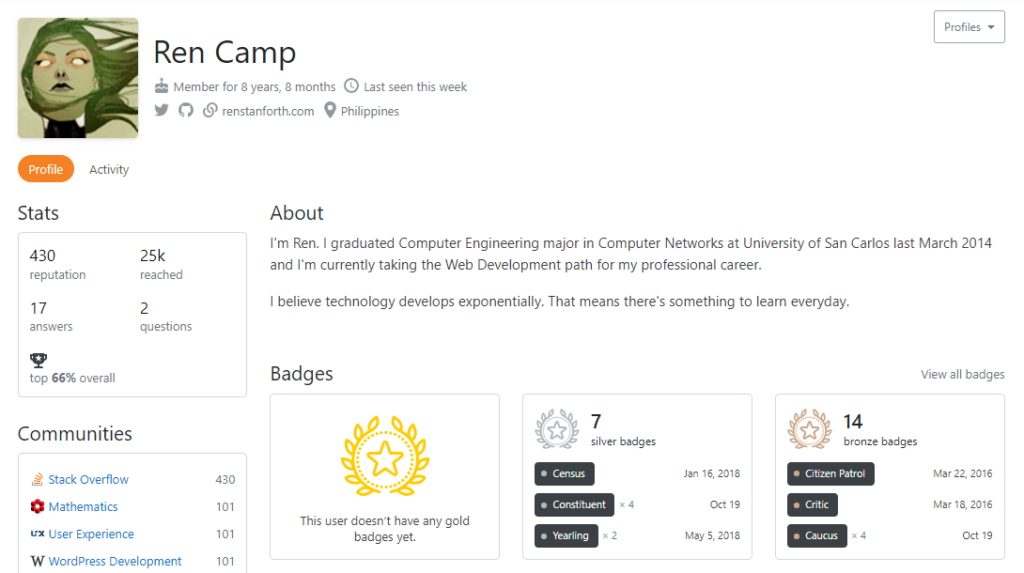
I’ve been a member since 2013, and at some point I was active in answering questions. I spend a few hours weekly during the first year looking for new questions, and gave answers (to the best of my abilities) as quickly as possible.
For the past few years, what I usually do is upvote useful and deserving questions and answers, and vote for the yearly community moderator elections. Having a reach of approximately 25k brings a little bit of pride because my answers helped a lot of people. And I know how it feels to be stuck on something, being helpless, and get stressed because of an error that’s not been fixed yet.
Stack Overflow has helped me through the years, and I thank the community for countless times of them saving my a**.
Project Management Tool: ActiveCollab
ActiveCollab is a tool for solving project management needs. Similar software that some of you might know are Jira, and Trello. I’ve been using ActiveCollab for months now and I prefer this than the others.
For those of you who don’t know, ActiveCollab offers organizing projects that can be split into tasks and subtasks, and set due dates. There are many features that ActiveCollab offers but what I really like about it is that it has its own time tracker for tasks, lets me know my daily and weekly hours, and the user interface (UI) is friendly for me.
It is not too overwhelming like Jira, and not as plain as Trello.
Project Repository Tool: GitLab
GitLab is a platform mainly for source code management. It is a place for users to maintain, monitor, and secure projects.
Similar to this are GitHub and Bitbucket.
GitHub was once my daily tool, but as you can see in my GitHub profile, I haven’t contributed there as much as before. For now, I am using a GitLab private server therefore making it my number 1.
Conclusion
There are a few tools that I haven’t mentioned here because I don’t use it everyday. I might create a separate blog for a complete list some other time.
My daily tools might differ from yours because of our personal preferences. This article is not about invalidating your preferred tools, but rather an appreciation article for the software/application developers and the community for making my daily life as a programmer comfortable and as convenient as ever.
Happy coding!
-
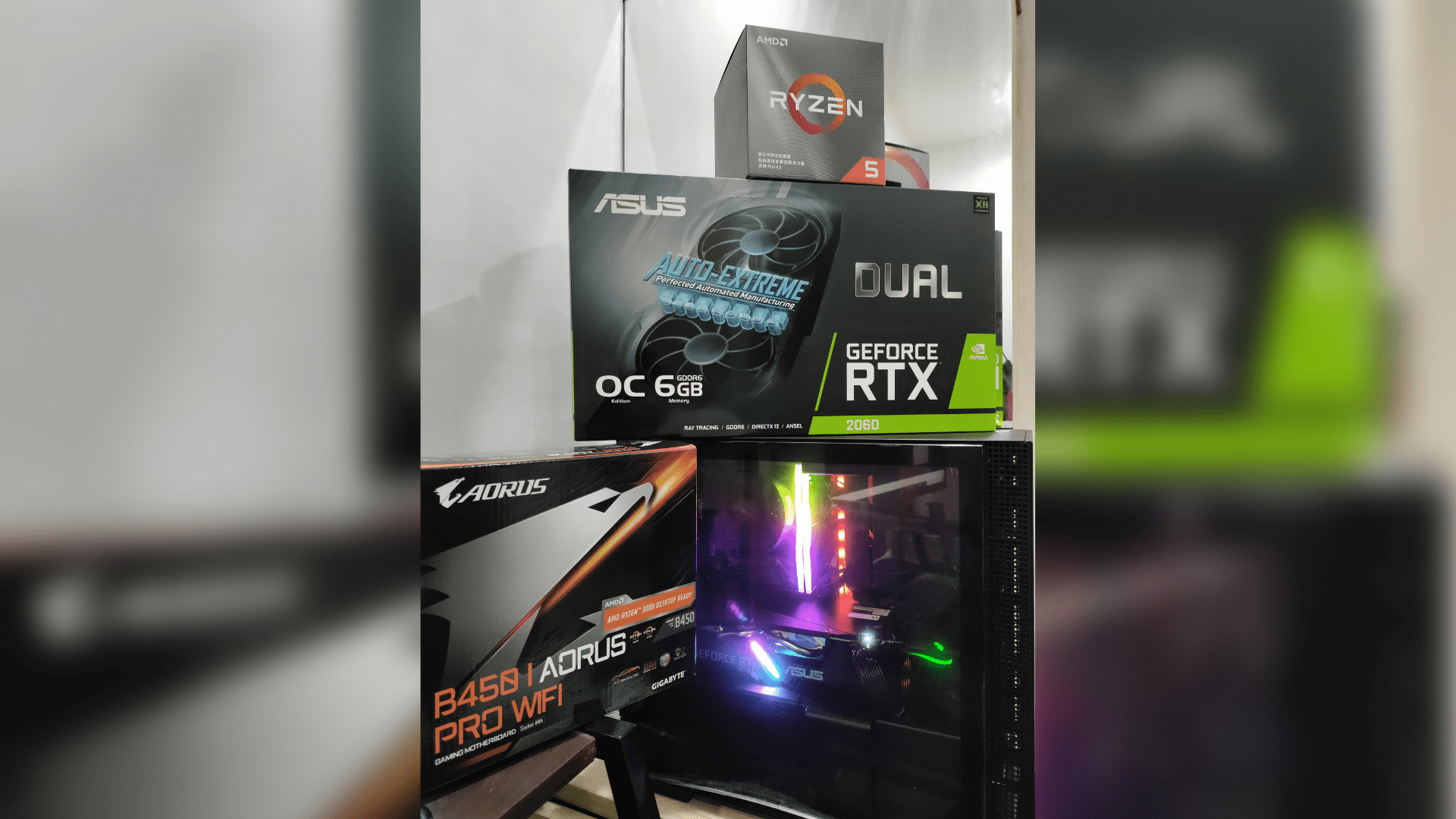
New Rig
As time passes by, video game developers release epic games that demand high performing rig. And I want to play some of them and experience high frame rates. I still have a working gaming laptop but it still struggles with games that require a powerful system to run smoothly and make it enjoyable. So, I decided that it was time for me for a new rig.
It was a hard decision because I had to take a big chunk from my savings to buy a PC that is best for me and my target budget. So, I promised myself to use it as much as I can and make it an investment.
I got it from Nutech Central Bloc Cebu IT Park. Their staff was helpful, and they listened to my preferences. The transaction went smoothly. Mad props to them!
Anyway, without further ado, the following are the specs.
Rig Specifications
- Processor: AMD Ryzen 5 3600X (12 threads – 3.8 GHz)
- Graphics Card: NVIDIA GeForce RTX 2060
- SSD: Kingmax PCIe SSD 512GB
- Memory: 16 GB RAM
- Platform: Windows 10 Pro

Building a PC
Pros
- You will learn a lot about building a PC, and which components are compatible with each other.
- Parts are customizable, expandable, or upgradable.
- Each component have warranties. Make sure to buy from legit merchants and always keep the receipt.
- Feeling of fulfillment.
Cons
- Expensive.
- Time consuming.
- Setting it up is tricking because there are factors you need to consider.
- Sometimes, some components don’t have warranties.
In some cases, you can build a cheaper rig but you’d have to compromise some components.
If you are considering to buy a new PC, and you’re worried you might mess the connections up, it would be safer to go for a pre-built PC. Show the shop the list of your preferred specifications, ask for a quote how much it would cost, and then settle or purchase.
I am looking forward to upgrading this rig soon for my future work and (mostly) play needs. Is this a start of my PC Master Race journey? We’ll see!
-
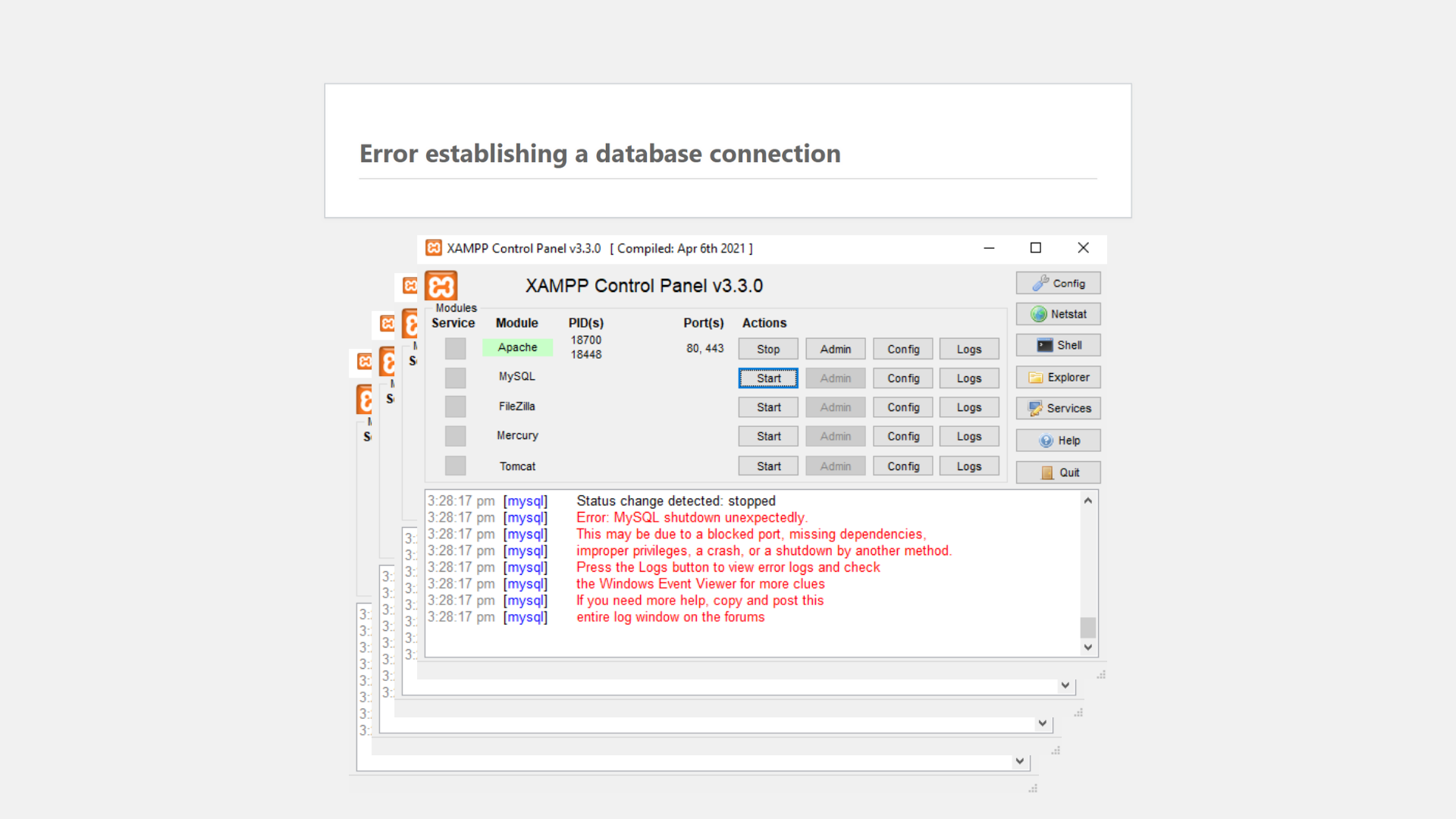
Error: MySQL Shutdown Unexpectedly
What gives me a mini-heart attack when I’m developing locally is having database error/s upon starting my dailies at work.
Number 0 culprit of this is the MySQL server not able to start. Why is this a suspect of mine? That’s because it was working before, and I have the correct database credentials.
When I checked my XAMPP control panel, I was greeted with this error:
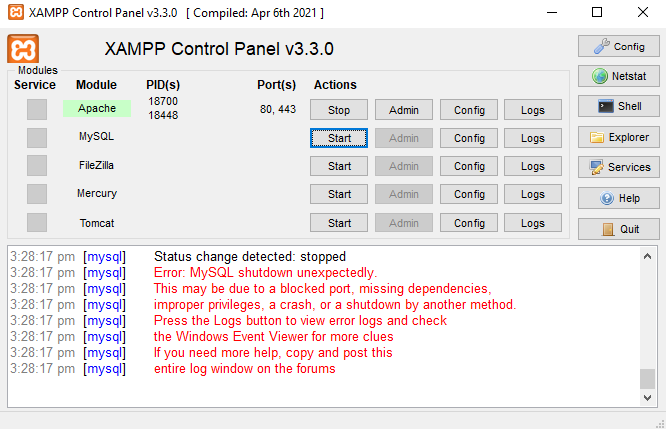
You might’ve encountered this error too. Error: MySQL shutdown unexpectedly. This may be due to a blocked port, missing dependencies, improper privileges, a crash, or a shutdown by another method. Press the Logs button to view error logs and check the Windows Event Viewer for more clues If you need more help, copy and post this entire log window on the forumsFor my side, this was caused by the sudden shutdown of the application. Always remember to shut it down properly next time!
How to fix this error?
1. Rename
xampp/mysql/datafolder first. Name it something likedata_backup.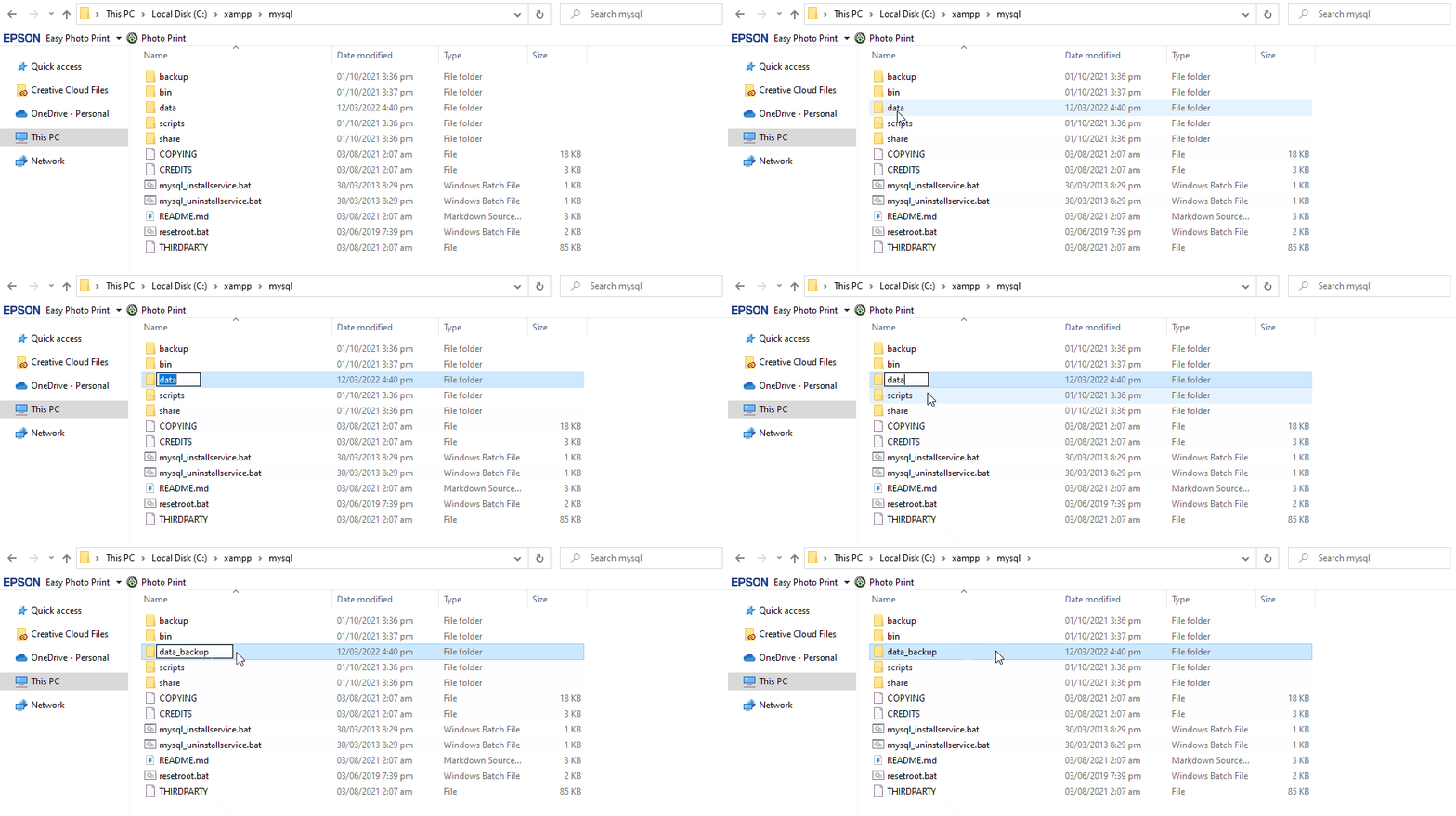
2. Then copy
xampp/mysql/backupfolder and name it asxampp/mysql/data. This will serve as your new data folder.
3. Copy all of the subfolders from
data_backupfolder to the new data folder. Make sure not to include the following folders: mysql, performance_schema, phpmyadmin, and test.4. In your data_backup folder, there is a file named ibdata1. Copy this file to the new
xampp/mysql/datafolder. Replace the ibdata1 that was copied fromxampp/mysql/backup. This file is important, so better NOT DELETE it at any cost!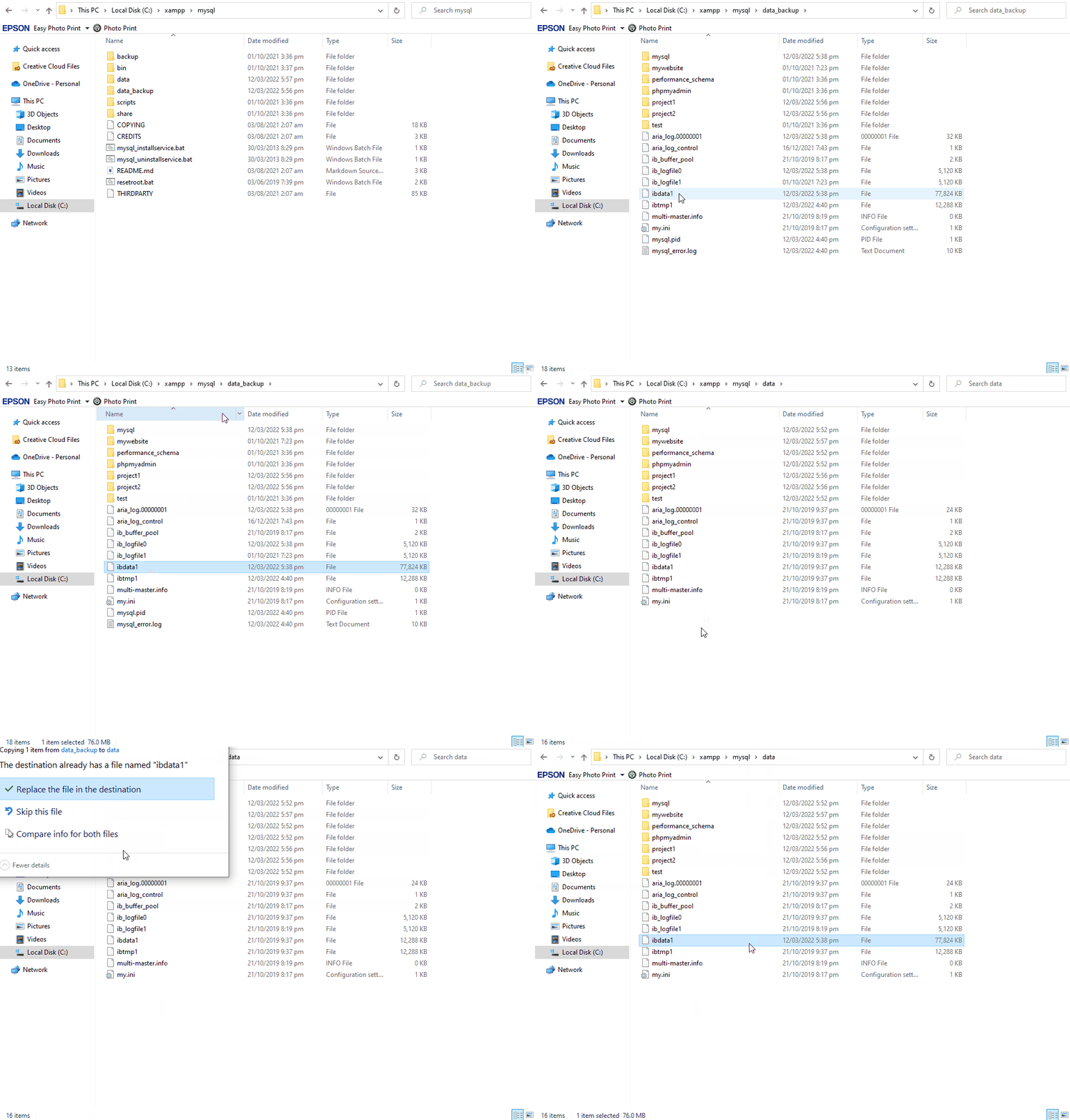
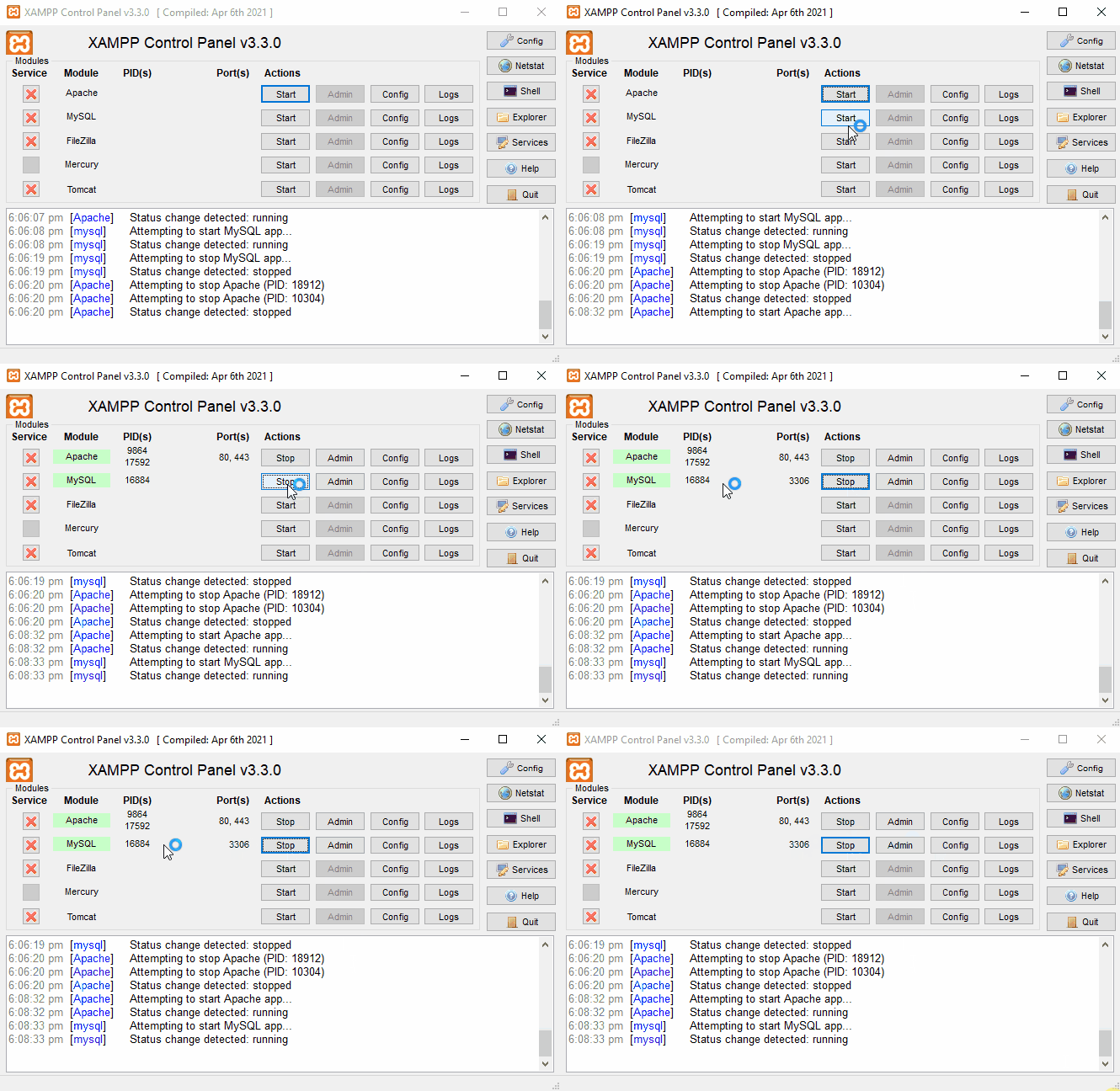
5. Start the MySQL server in the XAMPP application. If it doesn’t start, run the application as administrator.
BUT WAIT, THERE’S MORE
The steps above will only copy the databases that you’ve created. This does not include the user accounts you’ve set in the mysql database. You will need to add those users again.
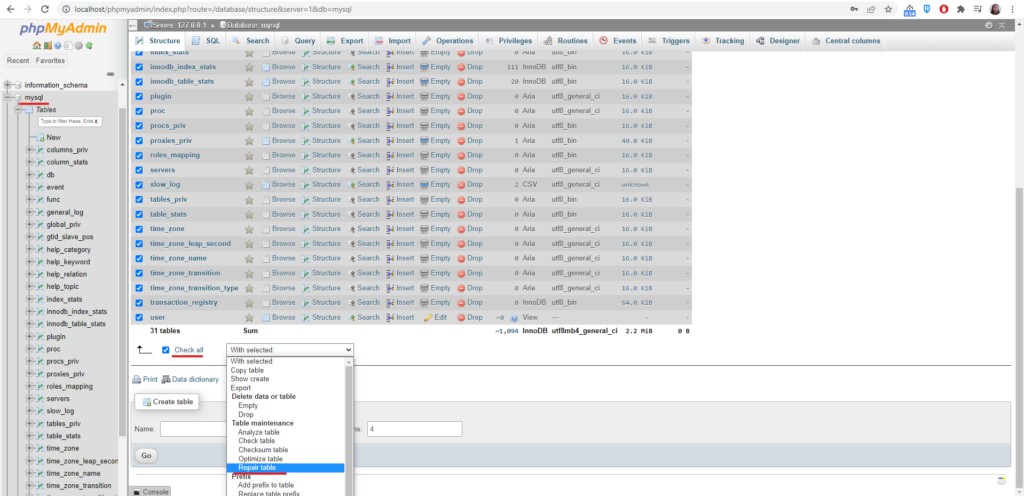
While I was about to add users, I have encountered the error #1034: Index for table ‘db’ is corrupt; try to repair it. To repair, do the following:
- Go to localhost/phpMyAdmin.
- Click the database table mysql.
- Check all of the tables.
- Choose With selected: choose Repair table which automatically repairs the table for you after clicking.
You can now add database users, then connect your local sites to the database.
Resources: